SpringBoot와 MySQL 연동하기

SpringBoot와 MySQL을 연동하는 방법에 대해 알아보자.

MySQL을 연동하는데 필요한 의존성 추가

1
2
implementation 'org.mybatis.spring.boot:mybatis-spring-boot-starter:2.1.4'
runtimeOnly 'mysql:mysql-connector-java'


application.yml

1
2
3
4
5
6
7
8
9
10
11
12
13
spring:
  datasource:
    driver-class-name: com.mysql.cj.jdbc.Driver
    url: jdbc:mysql://localhost:3306/test?serverTimezone=Asia/Seoul&characterEncoding=UTF-8
    username: root
    password: 1234

    
mybatis:
  type-aliases-package: com.spring.security.example.**.dao
  mapper-locations: classpath:com/spring/security/example/**/sql/*Mapper.xml
  configuration:
    map-underscore-to-camel-case: true
  • spring.datasource : Database 연동 관련 설정 정보
    • drive-class-name : MySQL 을 연동하고자 하므로 com.mysql.cj.jdbc.Driver
    • url : 사용할 database url
    • username : 데이터베이스 계정
    • password : 계정 비밀번호
  • mybatis : Mapper 관련 설정
    • type-aliases-package : mapper에서 사용할 클래스의 위치, Mybatis 에서 alias 를 만들어 준다.
    • mapper-locations : mapper 파일의 위치
    • configuration.map-underscore-to-camel-case : 테이블 필드명에 있는 underline(_)을 DAO에서 camelCase로 변경해줌
      • ex) table: user_id → DAO : userId


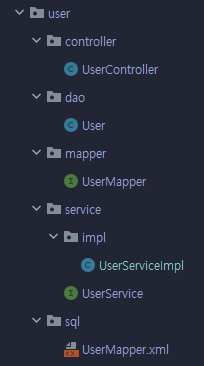
패키지 구조

  • 패키지명 : com.spring.security.example

패키지 구조


contoller

  • UserController
1
2
3
4
5
6
7
8
9
10
11
12
13
14
15
16
@Controller
public class UserController {
    
    private final UserService userSerivce;
    
    public UserController(UserService userService) {
        this.userSerivce = userService;
    }
    
    @ResponseBody
    @GetMapping("/user/{uid}")
    public User findUserByUid(@PathVariable String uid) {
        return userService.findUserByUid(uid);
    }

}

dao

  • UserDAO
1
2
3
4
5
6
@Data
public class User {
    private String uid;
    private String name;
    private String password;
}
  • @Data : @Getter, @Setter, @RequiredArgsConstructor, @ToString, @EqualsAndHashCode 어노테이션을 자동으로 설정해주는 Lombok 어노테이션

mapper

  • UserMapper
1
2
3
4
5
//@Repository
@Mapper
public interface UserMapper {
    User findUserByUid(String uid);
}
  • @Repository : 미리 MapperScan설정을 한 뒤 Dao 계층에서 생성된 Bean을 서비스 계층에 주입함
    • 여러개의 매퍼를 사용하기 위해 Mapper scan이 필요하며 방법은 3가지임
      1. XML 기반 : <mybatis:scan/> 엘리먼트 사용
      2. XML 기반 : 스프링 XML 파일을 사용해서 MapperScannerConfigurerbean 으로 등록
      3. JAVA 기반 : @MapperScan 어노테이션 사용
    • 자세히 알고 싶다면 [Spring] @Mapper는 언제 사용하는걸까?
  • @Mapper : xmlnamespace 를 통해 Bean 이 생성되어 서비스 계층에 삽입됨

service

  • UserService
1
2
3
public interface UserService {
    User findUserByUid(String uid);
}
  • impl/UserServiceImpl
1
2
3
4
5
6
7
8
9
10
11
12
13
14
15
@Service
public class UserServiceImpl implements UserService{
    
    private final UserMapper userMapper;
    
    public UserServiceImpl(UserMapper userMapper) {
        this.userMapper = userMapper;
    }

    @Override
    public User findUserByUid(String uid) {
        return Optional.ofNullable(userMapper.findUserByUid(uid)).orElseThrow(() -> new RuntimeException("해당 아이디를 찾을 수 없습니다."));
    }
    
}

sql

  • UserMapper.xml
1
2
3
4
5
6
7
8
<?xml version="1.0" encoding="UTF-8"?>
<!DOCTYPE mapper PUBLIC "-//mybatis.org//DTD Mapper 3.0//EN" "<http://mybatis.org/dtd/mybatis-3-mapper.dtd>">
<mapper namespace="com.spring.security.example.user.mapper.UserMapper">
	<select id="findUserByUid" parameterType="string" resultType="User">
		SELECT * FROM user
		WHERE uid = #{uid}
	</select>
</mapper>
  • 해당 mappernamespace@Mapper 어노테이션과 연결됨
  • application.yml 파일의 mapper-locations 설정으로 mapper 파일 등록됨
  • application.yml 파일의 type-aliases-package 의 설정으로 resultType 에서 User 를 사용 가능함

References

The difference between @Mapper and @Repository in spring boot